iPhone · iPad · Mac · $4.99 · Productivity
dotMD
Live Markdown. Plain files.
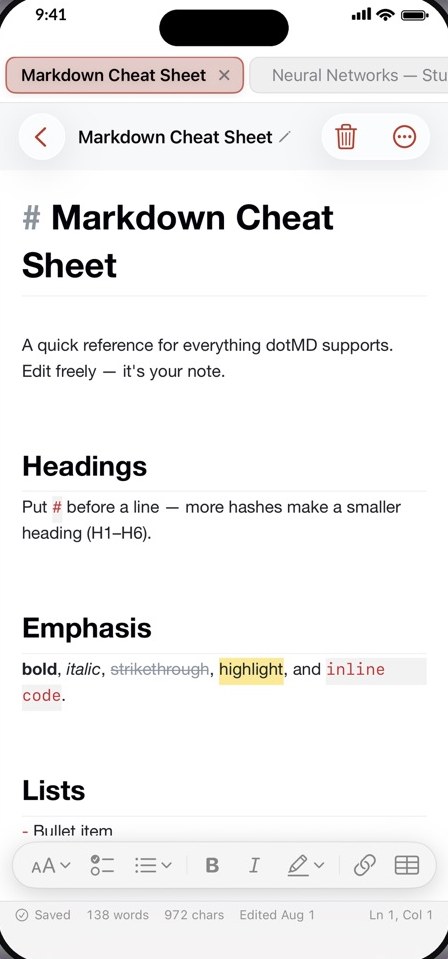
A Markdown editor that shows formatting as you type. Headings grow, bold turns bold, tables draw themselves in place, and the syntax markers appear only on the line you are editing.
What it does
Writing that looks like what it means.
Live editing
Formatting as you type
Headings grow, bold turns bold and tables draw themselves in place. Syntax markers appear only on the line you are editing.
No modes
No split preview
There is no separate preview pane to switch to. What you write is what you see.
Plain files
Notes are ordinary .md files
They live in the folder you choose. Open them with any other Markdown app, any time.
Sync
iCloud Drive or Dropbox
Point each device at the same folder to keep iPhone, iPad and Mac in step. Works on a free Apple ID.
Organise
Themes, folders, tags and tabs
Twelve editor themes, folders, tags and browser-style tabs for moving between notes.
Export
Out in any format
Export to Markdown, PDF, HTML, RTF or plain text.
Your notes are just files.
dotMD stores your notes as plain Markdown files in the folder you choose on your device. It collects no data, shows no ads and never asks for an account.
- Where notes live
- .md files in the folder you choose
- Sync
- iCloud Drive or Dropbox, if you turn it on
- Data collected
- None
- Devices
- iPhone, iPad and Mac, one purchase
Questions
Where are my notes?
They are ordinary .md files in the folder you chose. You can open them with any other Markdown app.
Can I sync between iPhone, iPad and Mac?
Yes, through iCloud Drive or Dropbox. Point each device at the same folder.
Is it one purchase for all devices?
Yes. Buy once with your Apple ID and install on every device signed in to it.