Mac app · $4.99 · Graphics & Design
Encadro
Frame your screen recordings.
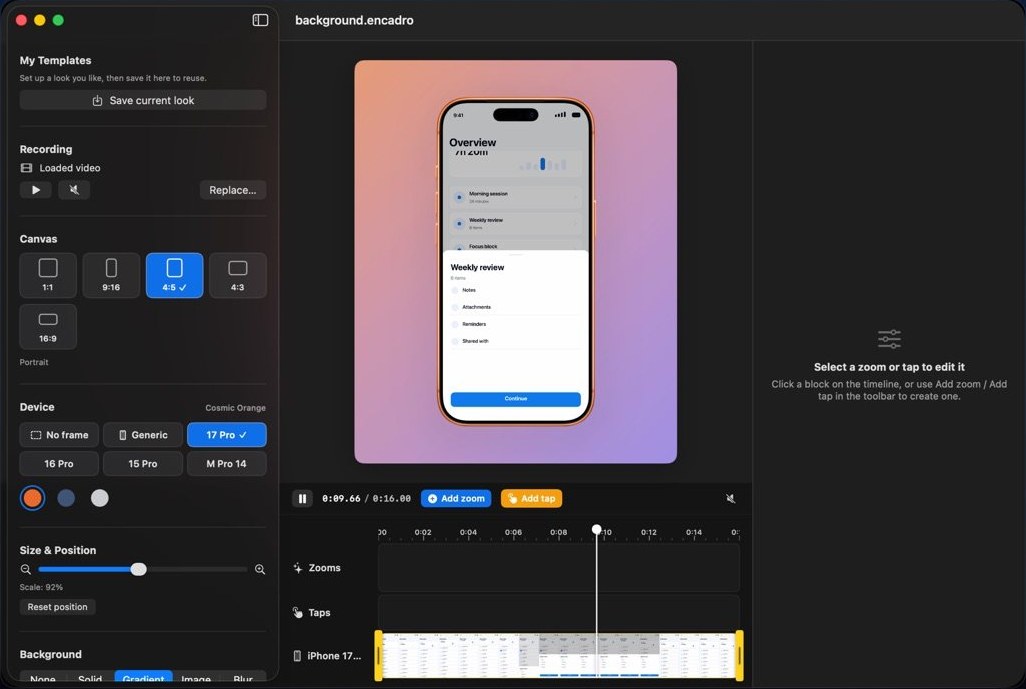
Drop in an iPhone recording and it lands inside a real device frame on a background you choose. Add zoom moves and tap feedback on a timeline, then export something ready to post.
What it does
From raw recording to ready to post.
Device frames
Real devices, real finishes
iPhone 17 Pro, 16 Pro and 15 Pro in their real finishes, and MacBook Pro 14 for Mac recordings.
Backgrounds
A background you choose
Each recording lands inside its device frame on the background you pick.
Zoom
Cinematic zoom
Six easing curves, from a gentle drift to a snappy punch, placed right on the timeline.
Taps
Tap feedback
Show every tap in one of three styles, so viewers can follow what you are doing.
Export
Transparent HEVC
Export with a transparent background for Final Cut Pro, Premiere, After Effects or Keynote.
Templates
Save the look
Save the look as a template and reuse it on the next recording.
Rendered on your Mac.
Encadro reads the recordings you open and writes the videos you export to your Mac. Rendering happens on your Mac, and nothing about you or your recordings is collected.
- Imports
- iPhone and Mac screen recordings
- Rendering
- On your Mac
- Data collected
- None
- Requires
- macOS 14 or later
Questions
Which recordings can I import?
Screen recordings from iPhone or Mac in the usual formats. iPhone recordings fit the iPhone frames; Mac recordings fit the MacBook Pro frame.
My export has a black background instead of transparent.
Choose the transparent export option and import the result into an editor that supports alpha, such as Final Cut Pro, Premiere, After Effects or Keynote.
Exports are slow.
Rendering happens on your Mac. Long or high-resolution recordings take longer, and closing other heavy apps helps.